30 days of cover
Free refills for drops in your purchased amount. A refund if we cannot complete the refill.
YOUR NEXT MOVE · LIKES
Buy high-quality TikTok likes for the video you choose, with clear package pricing and a 30-day refill guarantee. Compare quantities, add your video link and keep your selection together in your bag.
Choose your package ↓CHOOSING YOUR PACKAGE
A product reveal, a portfolio clip or a video you have spent time editing: a likes package lets you choose one specific post. The quantity you select applies to that video, so start with the post you want people to see when they visit your profile.
Use the package grid to compare the total cost of each quantity. A smaller package offers a lower starting spend; a larger one puts more likes on the same video. Choose around the post and your budget rather than buying a quantity you do not need.
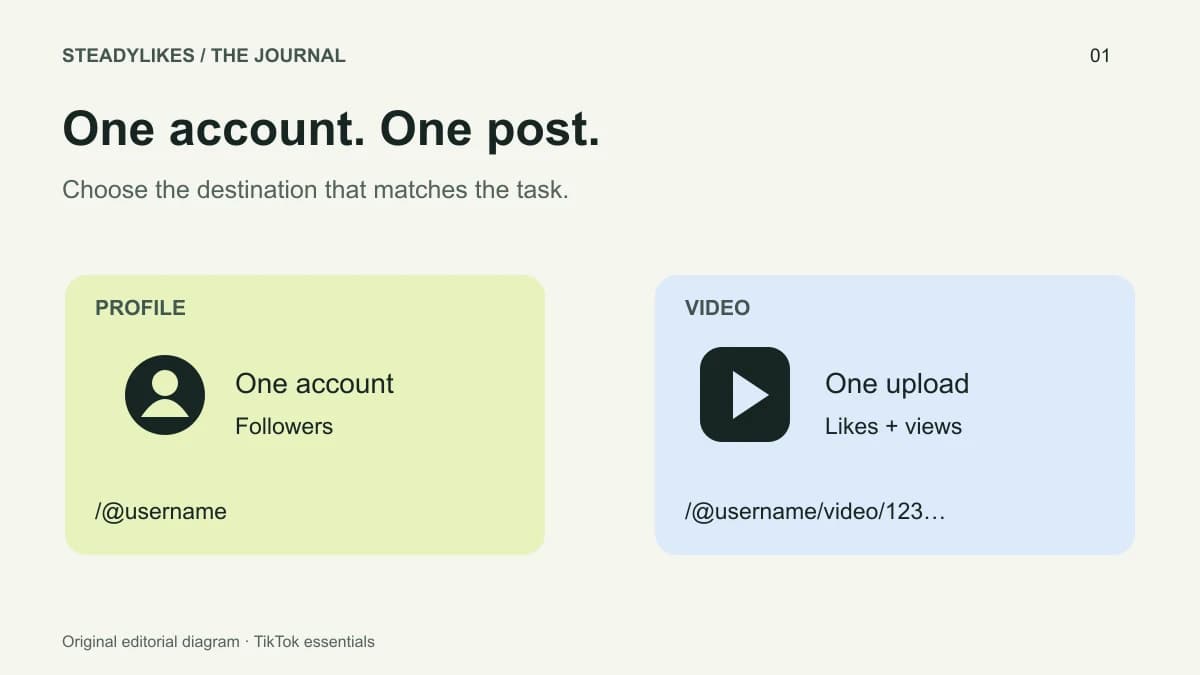
Likes, views and followers serve different purposes. This page is for a video’s like count. If you want a views package for that post or followers for the account, select the corresponding service so the quantity and destination match your intention.
Pair your video selection with a TikTok views package, or choose followers when your focus is the account behind the video.
COMPARE THE NUMBERS
Compare the total price and the cost per 100 likes. All packages include our 30-day refill guarantee.
| Package quantity | Total price | Per 100 likes |
|---|---|---|
| 100 likes | $1.99 | $1.99 |
| 200 likes | $3.49 | $1.75 |
| 500 likes | $6.49 | $1.30 |
| 1,000 likes | $9.99 | $1.00 |
| 2,000 likes | $16.99 | $0.85 |
| 5,000 likes | $32.99 | $0.66 |
If you have one video in mind, compare packages for that post alone. If you are choosing several videos, plan each selection separately: the same budget can mean one larger package or several smaller packages for different links. The bag shows each destination so you can compare the complete selection before continuing.
The per-unit figure helps compare package sizes; the total price is what you use to plan your spend. Select your package above, then review the exact TikTok destination in your bag.
Choose likes quantity ↑FROM PACKAGE TO BAG
Open the exact video you want to use.
Copy its full TikTok video URL, including /video/ and its ID.
Select your likes quantity and check the price in USD.
Review the video link and package together in your bag.
Already have an order? Track payment and delivery with your private order access.
UNDERSTAND YOUR SERVICE
For a business profile, start with a post that explains the product clearly: a demonstration, a before-and-after example of your own work, or an answer to a customer question. For a creator, it might be the clip that best represents a recurring series.
Choose the video you intend to keep using. If you have several versions of an edit, settle on the final upload and check the caption and account name before copying its link. A repost has a different video address. Keeping the selected post and package together avoids putting a budget against an older version of the same idea.
Compare the same quantity first, then check whether the quoted price is a package total or a rate per 1,000. A low advertised starting price can describe a much smaller purchase than the one you need. Currency matters too: compare totals in the same currency before deciding which offer fits your budget.
After price, compare what happens if there is an issue. Look for an identifiable support contact and a written service commitment. A quality label alone does not explain the process for resolving a missing delivery or a later drop.
Write down the post’s visible counts before the service starts, along with the date and purchased quantity. When you review the post later, distinguish the purchased likes from other activity rather than treating every change as an organic response.
For a product demonstration, useful questions include whether viewers asked relevant questions or visited your profile. For a tutorial, consider whether the comments reveal a point that needs a clearer explanation. A higher like count alone does not answer either question; use the actual feedback to decide what to publish next.
Payment status and delivery status describe different stages. Open private order tracking and check the affected item, particularly if several services are in the same order. A payment confirmation is not itself evidence that the likes have arrived.
If the recorded status and the post do not match, email support with the order reference and describe the discrepancy. Mention whether the video was removed or replaced after selection. Avoid submitting a duplicate order just to investigate the first one.
ACCOUNT ACCESS & SERVICE COVERAGE
There are separate questions behind “safe”: what account access is requested, how your information is handled, and what support covers the purchased service. At SteadyLikes, your video link identifies the destination; our package form does not ask for your TikTok password.
These protections do not amount to a guarantee about TikTok’s account decisions. SteadyLikes is independent of TikTok and cannot promise platform approval, immunity from account action or a particular organic result.
Open the exact post and check its full video URL before adding a package. Likes apply to that video alone. A link to your profile does not identify which upload you mean, and a likes package does not include a separate views service.
Keep passwords, login verification codes and your private order access code out of support messages. Read our privacy and cookie policy for the information used by the bag, order tracking and support.
A likes package covers likes on the selected post. It does not promise placement on the For You feed, search rankings, comments or sales. Keep the original video link with your order reference so a later support request points to the same post.
For a drop in the purchased amount, follow the refill request steps. For another service question, contact our support team with the relevant package or order reference. Our terms of service explain package scope and how to raise an order question.
QUALITY WITH A CLEAR COMMITMENT
If your purchased likes, followers or views drop within 30 days, we refill the missing amount at no extra cost. If we cannot complete the refill, we provide a refund.
Read our refill and refund commitment →Need help with a refill? Email info@steadylikes.com with your order reference.
Free refills for drops in your purchased amount. A refund if we cannot complete the refill.
Choose a video or profile. Our package forms do not ask for your TikTok password.
Compare quantities and USD prices, then review your selections together in your bag.
BEFORE YOU CHOOSE
It includes the selected quantity of high-quality TikTok likes for one video, backed by our 30-day refill guarantee. Followers and views are separate packages.
Yes. Add a package with the first video link, then add another package with the next link. Each selection remains a separate item in your bag.
No. The package form asks for your video link. You do not need to share your TikTok password to select a service.
Compare the quantities and total prices above. Start with your budget and the particular video you want to focus on; you can review or remove the selection in your bag.
The form identifies the post by its full video URL, not its upload date. Use a published post you intend to keep. If a timing requirement is important, ask about the package before choosing.
The grid contains the available quantities. The per-100 figure is a price comparison, not a custom quantity field. Contact support if none of the listed options matches your requirement.
PRACTICAL TIKTOK READING